
Anúncios
- Modern technology has transformed how we measure spaces, bringing professional-grade tools right into our pockets through innovative tape measure apps that deliver accurate results instantly.


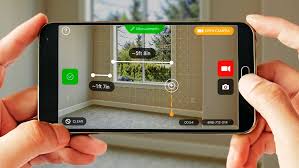
Gone are the days when measuring a room required bulky equipment or waiting for professional assistance. Digital tape measure applications harness your smartphone’s advanced sensors and camera capabilities to provide measurements with remarkable precision. Whether you’re planning furniture arrangements, tackling DIY projects, or working on professional renovations, these apps eliminate guesswork and streamline your workflow.
The convenience of having measurement tools available 24/7 on your device has revolutionized home improvement, interior design, and construction planning. These applications combine augmented reality technology with sophisticated algorithms to calculate distances, areas, and volumes within seconds. 📱
Anúncios
Understanding How Tape Measure Apps Actually Work
Digital measuring applications leverage multiple technologies embedded in modern smartphones. The primary method involves augmented reality (AR) combined with depth-sensing cameras. When you point your phone at an object or space, the app analyzes the camera feed and uses complex mathematical calculations to determine real-world dimensions.
Most advanced apps utilize LiDAR sensors (available in newer iPhone models and select Android devices) that emit laser pulses to accurately map distances. For devices without LiDAR, the apps rely on visual positioning and movement tracking. You simply mark two points on your screen, and the app calculates the distance between them using trigonometry and perspective analysis.
Anúncios
The accuracy of these measurements can reach within 1-2% margin of error when used correctly, making them suitable for most everyday applications. Professional-grade measurements may still require traditional tools, but for quick estimations, furniture shopping, or home projects, these apps deliver impressive reliability.
Key Features That Make These Apps Indispensable 🔧
Modern tape measure applications pack numerous features that extend far beyond simple linear measurements. Understanding these capabilities helps you maximize their utility across various situations.
Multi-dimensional measurement capabilities allow you to capture length, width, height, area, and even volume calculations with just a few taps. This proves invaluable when determining if that new sofa will fit through your doorway or calculating how much paint you need for a room.
Photo annotation and markup tools enable you to save measurements directly onto images. You can create detailed floor plans, annotate renovation ideas, and share specifications with contractors or family members instantly. This visual documentation eliminates confusion and keeps everyone on the same page.
Unit conversion features seamlessly switch between metric and imperial measurements. Whether you’re working with centimeters, inches, meters, or feet, the app handles conversions automatically, preventing costly miscalculations.
History and project organization let you save multiple measurements under different project names. Planning a kitchen remodel while also measuring your garage? Keep everything organized in separate folders for easy reference.

Practical Scenarios Where Digital Tape Measures Shine ✨
The versatility of these applications becomes apparent across countless real-world situations. Home decorators use them to visualize furniture placement before making expensive purchases. Real estate agents quickly measure properties during showings, providing instant square footage calculations to interested buyers.
DIY enthusiasts find these apps perfect for planning woodworking projects, building shelves, or creating custom storage solutions. No more returning to the hardware store because you forgot a crucial measurement—your phone contains a complete record of everything you measured.
Renters benefit tremendously when apartment hunting. Quickly measure rooms to determine if your existing furniture will fit, measure closet dimensions, and calculate available storage space. This information helps you make informed decisions without carrying a physical tape measure to every viewing.
Professional applications extend to flooring contractors estimating material requirements, interior designers creating space plans, and photographers calculating optimal shooting distances. The convenience of instant measurements accelerates workflows across numerous industries.
Step-by-Step Guide to Accurate Measurements
Achieving precise results with tape measure apps requires following proper techniques. Start by ensuring adequate lighting in your measurement area. Poor lighting conditions can confuse the camera sensors and reduce accuracy significantly.
When taking measurements, move your phone slowly and steadily. Rapid movements disrupt the app’s ability to track spatial references accurately. Begin by pointing your camera at the surface or object you want to measure, allowing the app a moment to calibrate and detect the plane.
Place your first measurement point at the starting location by tapping the screen. Many apps display a target or crosshair to help you position points precisely. Move your phone to the ending point while keeping the surface visible in the frame. Tap again to set the second point, and the app instantly displays the distance.
For room measurements, start from one corner and work systematically around the space. Take multiple measurements of the same dimension to verify accuracy. If readings differ significantly, recalibrate the app and try again with slower, more deliberate movements.
Maximizing Accuracy and Avoiding Common Mistakes 🎯
Understanding limitations prevents frustration and ensures reliable results. Tape measure apps work best on flat, well-defined surfaces with clear edges. Highly reflective materials, transparent surfaces, or areas with complex patterns may challenge the detection algorithms.
Calibration matters significantly. Many apps include calibration features that fine-tune accuracy based on your specific device. Spending two minutes on initial calibration can improve measurement precision across all subsequent uses.
Maintain appropriate distance from objects. Standing too close or too far can introduce measurement errors. Most apps work optimally when you’re positioned 3-10 feet from the target, though this varies by application and device.
Environmental factors affect performance. Bright sunlight can create glare that interferes with camera tracking, while very dim conditions provide insufficient visual data. Indoor measurements typically yield more consistent results than outdoor readings.
Regular app updates ensure you benefit from the latest algorithmic improvements and bug fixes. Developers continuously refine measurement accuracy through software updates, so keeping your app current maximizes performance.
Comparing Digital Apps to Traditional Tape Measures
Physical tape measures remain irreplaceable for certain applications, particularly when working with very small objects or requiring absolute precision for construction projects. However, digital apps offer distinct advantages that make them complementary tools rather than complete replacements.
Convenience represents the primary benefit. Your phone accompanies you everywhere, making spontaneous measurements possible without planning ahead. Need to check if that vintage dresser at the flea market fits your bedroom? Your phone provides instant answers.
Documentation capabilities surpass traditional tools entirely. Tape measures give you a number that you must manually record. Apps automatically save measurements with timestamps, photos, and project notes, creating comprehensive records for future reference.
Safety considerations favor digital solutions in certain scenarios. Measuring high ceilings or awkward spaces becomes safer when you don’t need to balance on ladders with physical measuring tools. Point your phone upward, and the app calculates height measurements from ground level.
Cost efficiency makes digital apps attractive for occasional users. While professional contractors justify investing in high-quality laser distance meters, homeowners completing occasional projects benefit from free or low-cost apps that deliver adequate accuracy without significant financial investment.
Privacy and Permission Considerations 🔒
Tape measure apps require camera access to function, which raises legitimate privacy questions. Reputable applications only access your camera when actively taking measurements and don’t record video or capture images without explicit permission.
Review app permissions before installation to understand what data the application accesses. Quality apps request only essential permissions—typically camera, photo library (for saving measurement images), and potentially location services for organizing projects by site.
Data storage policies matter when dealing with sensitive projects. If measuring commercial spaces or properties with confidentiality concerns, choose apps that store measurements locally on your device rather than uploading data to cloud servers.
Regular permission audits through your phone’s settings ensure apps maintain appropriate access levels. If you’ve stopped using a measurement app, consider revoking its permissions or uninstalling it completely to minimize potential privacy exposure.
Advanced Features for Power Users
Beyond basic linear measurements, sophisticated apps offer advanced capabilities that transform your smartphone into a comprehensive spatial analysis tool. Floor plan creation features allow you to map entire rooms or properties, generating detailed layouts complete with door and window positions.
3D modeling integration lets you export measurements to CAD software or design applications. Architects and designers appreciate this seamless workflow that transfers real-world dimensions directly into professional planning tools.
Angle measurement tools help with projects requiring precise alignments. Whether hanging artwork, installing shelving at specific angles, or verifying if walls are truly perpendicular, these features expand functionality beyond simple distance calculations.
Remote collaboration capabilities enable real-time sharing of measurements with team members or family. Walk through a space while someone elsewhere views your measurements live, facilitating coordinated decision-making without requiring everyone to be physically present.
Tips for Furniture Shopping With Measurement Apps 🛋️
Furniture shopping becomes dramatically more efficient when armed with accurate room measurements. Before visiting stores or browsing online, measure all relevant dimensions including doorways, hallways, staircases, and the final placement location.
Create a comprehensive measurement profile for each room. Include ceiling heights, outlet locations, window dimensions, and existing furniture you plan to keep. This complete picture prevents purchasing items that technically fit the space but create awkward layouts or block essential features.
Virtual placement features in some apps allow you to visualize furniture using augmented reality. Position a digital representation of potential purchases in your actual space to see how items look before buying. This technology reduces returns and increases satisfaction with your selections.
Save measurement sets with descriptive names like “Living Room – March 2024” so you can reference them months later when shopping opportunities arise. That perfect coffee table you find unexpectedly becomes an informed purchase rather than a gamble.
Troubleshooting Common Measurement Issues
When measurements seem inconsistent or obviously incorrect, several troubleshooting steps can resolve issues quickly. First, clean your phone’s camera lens—smudges and dirt significantly degrade measurement accuracy by obscuring visual tracking.
Restart the app if it behaves erratically or freezes. Like any software, occasional glitches occur, and a fresh start typically resolves temporary problems. If issues persist, check for available updates or consider reinstalling the application.
Recalibrate your device when moving between environments. Apps calibrated indoors may perform differently outdoors due to lighting changes and different surface textures. Many apps offer quick recalibration options accessible from settings menus.
Verify that your phone’s operating system is current. Measurement apps rely heavily on ARKit (iOS) or ARCore (Android) frameworks that receive improvements through OS updates. Running outdated system software can limit app performance regardless of the app version.
The Future of Digital Measurement Technology 🚀
Emerging technologies promise even more impressive capabilities for smartphone-based measurement tools. Machine learning algorithms are becoming increasingly sophisticated at recognizing objects and automatically detecting what you want to measure without manual point placement.
Integration with smart home ecosystems will enable seamless connections between measurements and automated home improvements. Imagine measuring windows and having custom blinds automatically quoted and ordered through integrated services.
Improved sensor technology in upcoming smartphone generations will deliver accuracy rivaling professional equipment. As LiDAR sensors become standard across more devices, measurement apps will achieve precision that eliminates any meaningful distinction between digital and traditional tools for most applications.
Collaborative measurement platforms are emerging that allow multiple users to contribute to shared project spaces. Teams working on renovations or moves can collectively add measurements, notes, and images, creating comprehensive project documentation accessible to everyone involved.
Making the Most of Your Digital Measuring Experience
Developing consistent measurement habits maximizes the value you extract from these applications. Establish a routine of measuring everything potentially relevant rather than only what seems immediately necessary. Those extra measurements often prove valuable when unexpected opportunities or challenges arise.
Organize measurements into clear project categories from the beginning. It’s tempting to quickly measure things without proper documentation, but investing thirty seconds in proper naming and organization saves significant time during later reference.
Combine digital measurements with traditional methods for critical projects. Use your app for initial planning and quick checks, but verify crucial dimensions with physical tape measures before making irreversible decisions like cutting expensive materials.
Share your measurement projects with relevant parties immediately. Whether coordinating with contractors, getting family input on renovations, or simply documenting your space for insurance purposes, prompt sharing ensures everyone has access to accurate information when decisions need to be made.
The transformation of smartphones into precision measurement tools represents one of technology’s most practically useful innovations. These apps democratize capabilities once requiring expensive equipment or professional services, empowering everyone to tackle projects with confidence. By understanding how these applications work, following best practices for accuracy, and leveraging advanced features strategically, you unlock tremendous value from technology already in your pocket. Whether you’re a seasoned contractor or someone who occasionally needs to measure something, digital tape measure apps offer convenience, accuracy, and functionality that enhance countless aspects of daily life. 📏

Toni Santos is a visionary artisan and conceptual designer who channels the beauty of living organisms into structural expression. At Zureste, Toni explores the intricate elegance of insect anatomy, organic flow, and bioinspired design to create art that feels both natural and otherworldly.
Each creation Toni brings to life reflects a harmonic tension between structure and softness, wildness and control — echoing the complex intelligence found in the natural world. From beetle-like silhouettes to root-shaped contours, his work blurs the lines between biology, sculpture, and modern art.
Guided by fascination for metamorphosis, evolution, and pattern in nature, Toni’s pieces embody transformation. His BioLight Collection and conceptual series like Insect Type and Structure Aesthetics offer viewers more than aesthetic value — they present immersive experiences of living design.
As the creative force behind Zureste, Toni invites us to rethink beauty, architecture, and identity through a new lens — one shaped by wings, bones, spirals, and the microscopic poetry of the organic.
His creations reflect:
-
Design deeply rooted in the geometry of life
-
Inspiration from insects, roots, and the unseen natural order
-
A blend of science, spirituality, and visual storytelling
Whether you’re a lover of strange beauty, an admirer of evolution’s artistry, or a creative mind seeking something different, Toni welcomes you into a world where living forms become meaning, and surreal becomes sublime.