
Anúncios
Alexa has revolutionized how we interact with technology through voice commands, offering a wide range of sounds, responses, and features that make daily tasks easier and more entertaining.


Amazon’s voice assistant has become an integral part of millions of homes worldwide, transforming ordinary spaces into smart environments. From playing your favorite music to controlling smart home devices, Alexa responds to your voice with remarkable accuracy and a diverse library of sounds and feedback tones.
Anúncios
Understanding the variety of sounds Alexa produces, along with mastering the most effective commands, can significantly enhance your experience. Whether you’re a new user or someone looking to maximize your device’s potential, exploring the full spectrum of Alexa’s capabilities opens up a world of convenience and entertainment. 🎵
Understanding Alexa’s Sound Library and Audio Responses
Alexa communicates through a sophisticated system of auditory cues, each designed to convey specific information or confirm actions. These sounds range from simple notification chimes to complex voice responses, creating an intuitive user experience that feels natural and responsive.
Anúncios
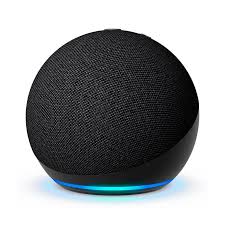
The blue ring light accompanied by a soft chime indicates Alexa is listening to your command. This visual and audio combination ensures you know precisely when the device is actively processing your voice input. After completing a task, you’ll hear a brief confirmation tone, signaling successful execution.
Error sounds differ noticeably from success tones. When Alexa doesn’t understand your request or encounters a problem, you’ll hear a distinctive sound that prompts you to rephrase or check your connection. These audio cues eliminate confusion and guide you toward successful interactions.
Notification Sounds That Keep You Informed 🔔
Alexa produces specific notification sounds for incoming messages, reminders, timers, and alarms. The yellow ring light paired with a gentle chime indicates you have unread notifications or messages waiting. Simply ask, “Alexa, what are my notifications?” to hear them.
Timer and alarm sounds are customizable, allowing you to choose from various tones and even celebrity voices. This personalization makes waking up or keeping track of cooking times more enjoyable and suited to your preferences.
Essential Voice Commands for Everyday Use
Mastering basic Alexa commands transforms your device from a novelty into an indispensable daily assistant. The most frequently used commands cover music playback, smart home control, information retrieval, and communication features.
For music enthusiasts, commands like “Alexa, play jazz music” or “Alexa, play my workout playlist” instantly fill your space with sound. You can also request specific songs, artists, albums, or even ask Alexa to identify currently playing tracks with “Alexa, what song is this?”
- Volume control: “Alexa, set volume to 5” or “Alexa, turn it up”
- Skip tracks: “Alexa, next song” or “Alexa, previous song”
- Set timers: “Alexa, set a timer for 20 minutes”
- Check weather: “Alexa, what’s the weather today?”
- News updates: “Alexa, what’s in the news?”
- Smart home: “Alexa, turn off the living room lights”
Advanced Commands for Power Users
Beyond basic functions, Alexa responds to sophisticated multi-step commands and routines. You can create custom phrases that trigger multiple actions simultaneously, streamlining your daily activities with a single voice command.
For example, saying “Alexa, good morning” can be programmed to turn on lights, read your calendar, provide weather updates, and start brewing coffee if you have compatible smart appliances. These routines save time and create seamless transitions throughout your day.

Customizing Alexa’s Voice and Sound Settings
Personalization options allow you to adjust Alexa’s voice characteristics, response speed, and sound effects. Through the Alexa app, you can modify settings to match your preferences and create a more tailored experience.
Alexa’s voice speed can be adjusted using the command “Alexa, speak slower” or “Alexa, speak faster.” This feature proves particularly useful for users who are learning English or prefer more deliberate speech patterns when receiving information.
You can also enable Brief Mode, which replaces verbal confirmations with simple chimes for routine tasks. This reduces unnecessary audio feedback while maintaining functionality, perfect for users who want quieter interactions. ⚙️
Changing Alexa’s Wake Word
While “Alexa” is the default wake word, you can change it to “Amazon,” “Echo,” “Computer,” or “Ziggy” through the app settings. This customization helps prevent accidental activations and allows multiple devices in one home to respond to different names.
Changing the wake word takes effect within seconds and applies only to the specific device you’ve selected, giving you granular control over your smart home ecosystem.
Entertainment Features and Fun Sounds
Alexa isn’t just functional—it’s entertaining. The assistant includes thousands of Easter eggs, games, and amusing responses that showcase Amazon’s commitment to creating an engaging user experience beyond mere utility.
Try commands like “Alexa, tell me a joke,” “Alexa, sing a song,” or “Alexa, beatbox” to discover the playful side of your device. These interactions add personality and make technology feel more approachable and human-like.
Alexa Skills expand entertainment possibilities exponentially. From interactive stories and trivia games to meditation sounds and sleep stories, the Skills library contains thousands of voice-activated applications that enhance your device’s capabilities. 🎮
Creating the Perfect Ambient Soundscape
Ambient sounds help with relaxation, focus, and sleep. Alexa offers an extensive collection of nature sounds, white noise, and calming audio environments accessible through simple voice commands.
Commands like “Alexa, play ocean sounds,” “Alexa, play thunderstorm sounds,” or “Alexa, play rain sounds” transform your environment instantly. You can set these sounds to play for specific durations or loop continuously throughout the night.
| Sound Type | Example Command | Best Use Case |
|---|---|---|
| White Noise | “Alexa, play white noise” | Sleep aid, concentration |
| Nature Sounds | “Alexa, play forest sounds” | Relaxation, meditation |
| Fireplace | “Alexa, play fireplace sounds” | Cozy atmosphere |
| Coffee Shop | “Alexa, play coffee shop sounds” | Working, studying |
Smart Home Integration and Control Commands
Alexa’s true power emerges when connected to smart home devices. From thermostats and locks to cameras and vacuum cleaners, voice control centralizes home automation into an effortless experience.
Setting up smart home devices requires linking them through the Alexa app, where you can organize devices into groups representing different rooms. Once configured, commands like “Alexa, turn off the bedroom lights” or “Alexa, set the thermostat to 72 degrees” control your environment hands-free.
Grouping devices enables room-specific control and whole-home commands. You can create a “Downstairs” group containing all lower-level lights and appliances, then say “Alexa, turn off downstairs” to control everything simultaneously. 🏠
Security and Camera Integration
Compatible security cameras stream directly to Echo Show devices or through the Alexa app. Commands like “Alexa, show me the front door camera” provide instant visual access to your property, enhancing home security through voice activation.
You can also enable routines that automatically turn on lights or lock doors at specific times, creating the appearance of occupancy when you’re away and adding an extra layer of security to your home.
Communication Features Through Alexa
Alexa facilitates communication through calling, messaging, and announcements across devices. These features keep households connected and enable hands-free communication when you’re busy with other tasks.
The Drop In feature allows instant voice connection between authorized devices, functioning like an intercom system throughout your home. Parents use it to call children for dinner, check on sleeping babies, or communicate between floors without shouting.
Announcements broadcast messages to all Alexa devices in your home simultaneously. Saying “Alexa, announce dinner is ready” sends your voice to every connected device, ensuring everyone hears important messages regardless of their location. 📢
Making Calls and Sending Messages
Voice calling through Alexa connects you to contacts who have the Alexa app or compatible devices. Commands like “Alexa, call Mom” initiate hands-free phone conversations using your internet connection, eliminating the need to locate your smartphone.
Text-to-speech messaging allows you to send messages by voice: “Alexa, send a message to John saying I’ll be there at 6.” Recipients with Alexa devices hear notifications and can listen to messages instantly.
Troubleshooting Common Sound and Command Issues
Occasionally, Alexa may have difficulty understanding commands or producing expected sounds. Most issues stem from connectivity problems, microphone obstructions, or settings configurations that require simple adjustments.
If Alexa isn’t responding properly, check your internet connection first. Weak Wi-Fi signals cause delayed responses, misunderstood commands, and intermittent functionality. Moving your device closer to your router or adding a Wi-Fi extender often resolves these problems.
Microphone sensitivity can be affected by physical obstructions or background noise. Ensure nothing is blocking the device’s top surface where microphones are located, and try reducing ambient noise when issuing commands. 🔧
Resetting and Recalibrating Your Device
When persistent issues occur, resetting your Alexa device often restores normal functionality. A soft reset involves unplugging the device for 30 seconds, while a factory reset returns it to original settings, requiring complete reconfiguration.
Voice training through the Alexa app improves recognition accuracy by learning your specific speech patterns. This feature particularly benefits users with accents or unique vocal characteristics, enhancing the overall command success rate.
Privacy Controls and Sound Management
Privacy concerns regarding voice assistants are valid and important. Amazon provides multiple controls that allow users to manage recordings, disable microphones, and control what data Alexa collects and retains.
The microphone mute button physically disconnects microphones, ensuring Alexa cannot listen even if accidentally activated. When muted, a red light indicates the device won’t respond to wake words until you manually unmute it.
Voice recordings can be reviewed and deleted through the Alexa app. You can remove individual recordings or enable automatic deletion after specified periods, giving you complete control over stored audio data. 🔒
Maximizing Your Alexa Experience
The full potential of Alexa emerges through consistent use and exploration of its extensive feature set. Regularly discovering new Skills, commands, and integrations keeps your experience fresh and increasingly valuable.
Creating routines streamlines repetitive tasks into single commands. Morning routines might include weather updates, calendar briefings, and news summaries, while evening routines could dim lights, lock doors, and play relaxing sounds—all triggered by one phrase.
Voice profiles allow Alexa to recognize different household members, personalizing responses based on who’s speaking. This feature delivers individualized calendar events, music preferences, and shopping lists, making shared devices feel personal to each user.
Exploring the Skills store regularly reveals new capabilities that match your interests and needs. From fitness coaching and recipe guidance to language learning and meditation, Skills transform Alexa from a simple assistant into a comprehensive life management tool.
Regular software updates automatically enhance functionality, add new features, and improve performance. Keeping your Alexa app updated ensures you’re accessing the latest capabilities and security improvements Amazon releases. ✨
The ecosystem continues evolving, with new devices, integrations, and capabilities announced regularly. Staying informed through Amazon’s official channels helps you maximize your investment and discover features you might otherwise overlook.
Whether you’re using Alexa for entertainment, productivity, smart home control, or communication, understanding its sound library and command structure empowers you to create a truly personalized and efficient voice-controlled environment that adapts to your lifestyle and preferences.

Toni Santos is a visionary artisan and conceptual designer who channels the beauty of living organisms into structural expression. At Zureste, Toni explores the intricate elegance of insect anatomy, organic flow, and bioinspired design to create art that feels both natural and otherworldly.
Each creation Toni brings to life reflects a harmonic tension between structure and softness, wildness and control — echoing the complex intelligence found in the natural world. From beetle-like silhouettes to root-shaped contours, his work blurs the lines between biology, sculpture, and modern art.
Guided by fascination for metamorphosis, evolution, and pattern in nature, Toni’s pieces embody transformation. His BioLight Collection and conceptual series like Insect Type and Structure Aesthetics offer viewers more than aesthetic value — they present immersive experiences of living design.
As the creative force behind Zureste, Toni invites us to rethink beauty, architecture, and identity through a new lens — one shaped by wings, bones, spirals, and the microscopic poetry of the organic.
His creations reflect:
-
Design deeply rooted in the geometry of life
-
Inspiration from insects, roots, and the unseen natural order
-
A blend of science, spirituality, and visual storytelling
Whether you’re a lover of strange beauty, an admirer of evolution’s artistry, or a creative mind seeking something different, Toni welcomes you into a world where living forms become meaning, and surreal becomes sublime.