
Anúncios
Amazon Alexa has revolutionized how we interact with technology at home, and the key to unlocking its full potential lies in discovering the right apps to enhance your experience.


Voice assistants have become an integral part of modern households, transforming ordinary devices into intelligent companions that respond to our commands. Alexa stands out as one of the most versatile voice assistants available, capable of controlling smart home devices, playing music, answering questions, and much more through specialized applications called Skills.
Anúncios
Whether you’re a new Alexa user or a seasoned smart home enthusiast, understanding which applications work best with your device can dramatically improve your daily routine. From productivity tools to entertainment options, the Alexa ecosystem offers thousands of possibilities waiting to be explored. Let’s dive into everything you need to know about applications for Alexa and how they can transform your living space.
🎯 Understanding Alexa Skills and Applications
Alexa Skills are essentially voice-activated applications that extend the functionality of your Amazon Echo or other Alexa-enabled devices. Unlike traditional mobile apps that require tapping and swiping, these skills respond to voice commands, creating a hands-free experience that feels almost magical.
Anúncios
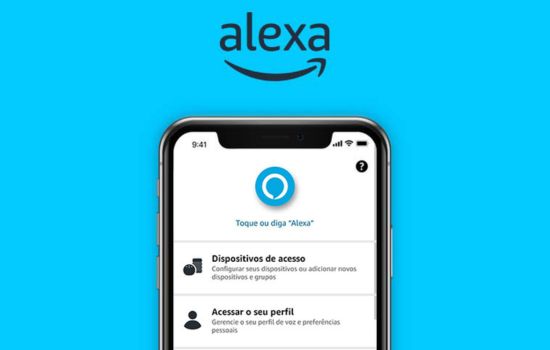
The Amazon Alexa app serves as your command center for managing all these skills and configuring your devices. Available for both Android and iOS platforms, this companion app allows you to browse thousands of skills, customize settings, create routines, and control connected smart home devices from anywhere.
Think of Skills as plugins for your voice assistant. Some come pre-installed, like weather updates and basic questions, while others need to be manually added through the Alexa app. The beauty of this system lies in its flexibility – you only install what you need, keeping your assistant streamlined and personalized.
📱 Essential Apps That Work with Alexa
The ecosystem surrounding Alexa extends far beyond Amazon’s own applications. Numerous third-party apps have integrated Alexa support, creating a seamless connected experience across your digital life.
Music and Entertainment Applications
Alexa shines brightest when it comes to entertainment. Spotify, Apple Music, Amazon Music, and Pandora all offer deep integration with Alexa devices. Simply link your accounts through the Alexa app, and you can request specific songs, artists, playlists, or genres without lifting a finger.
Audible integration allows audiobook lovers to continue their stories across devices seamlessly. You can ask Alexa to resume your current book, skip chapters, or adjust playback speed – all through natural voice commands that feel intuitive from the first use.
Podcast enthusiasts will appreciate TuneIn, which brings thousands of radio stations and podcasts to your Echo device. Whether you’re interested in news, comedy, or educational content, voice control makes discovering and enjoying audio content remarkably simple.
Smart Home Control Applications
The true power of Alexa emerges when controlling smart home devices. Philips Hue, Ring, Nest, Samsung SmartThings, and TP-Link all offer Alexa skills that transform your voice into a universal remote for your entire home.
Through these integrations, you can dim lights, adjust thermostats, view security cameras, lock doors, and control dozens of other devices without moving from your couch. The Alexa app becomes your central hub for organizing these devices into groups and creating automated routines.
IFTTT (If This Then That) deserves special mention as it connects Alexa to hundreds of services that might not have native skills. This powerful automation platform lets you create custom voice commands that trigger complex actions across multiple apps and devices.

🛠️ Setting Up Your Alexa App for Maximum Efficiency
Getting started with the Alexa app requires just a few minutes, but optimizing it properly can save you countless hours later. After downloading the app from your device’s app store, you’ll sign in with your Amazon account credentials.
The initial setup wizard guides you through connecting your Alexa device to Wi-Fi and configuring basic preferences. Take time during this process to enable location services if you want accurate weather forecasts and local information.
Once connected, explore the Skills section within the app. Browse by category – productivity, lifestyle, games, news, or smart home – to discover applications that match your interests. Each skill displays reviews and descriptions to help you decide before enabling.
Creating Routines That Work for You
Routines represent one of Alexa’s most powerful features, yet many users overlook them entirely. These automated sequences trigger multiple actions with a single voice command or at scheduled times throughout the day.
A morning routine might turn on lights gradually, read your calendar, provide weather updates, and start your coffee maker – all initiated by saying “Alexa, good morning.” Evening routines could lock doors, turn off lights, lower thermostats, and play relaxing sounds for sleep.
The Alexa app makes creating routines straightforward through an intuitive interface. You select triggers (voice commands, schedules, device actions), then add actions you want Alexa to perform. Start simple with two or three actions, then expand as you become comfortable with the system.
🎮 Entertainment and Gaming Skills Worth Exploring
Beyond practical applications, Alexa offers entertaining experiences that showcase voice interaction’s creative possibilities. Trivia games, interactive stories, and sound-based adventures provide screen-free entertainment for all ages.
Jeopardy!, Song Quiz, and Akinator represent popular game skills that have attracted millions of users. These games adapt traditional formats for voice interaction, creating surprisingly engaging experiences that work well for families and parties.
For children, skills like Adventure Academy, Sesame Street, and various bedtime story apps offer educational and entertaining content. Parents can enable kid-specific skills and use FreeTime features to create safe, age-appropriate experiences.
📰 News and Information Applications
Staying informed becomes effortless when you configure news skills properly. Flash Briefing customization allows you to select preferred news sources, arranging them in order of importance for your daily update.
Major news organizations including NPR, BBC, CNN, and The Washington Post offer Alexa skills delivering up-to-date reporting. You can also add specialized briefings for sports, finance, technology, or any niche interest you follow regularly.
Beyond news, question-answering skills provide quick access to information. While Alexa’s built-in knowledge covers basics, specialized skills like Wikipedia, Wolfram Alpha, and various reference tools offer deeper dives into specific topics.
🍳 Lifestyle Applications for Daily Living
Kitchen-focused skills transform Alexa into a capable cooking assistant. Applications from AllRecipes, Food Network, and Kitchen Stories offer step-by-step voice-guided recipes that keep your hands free while cooking.
Measurement conversion, timer management, and substitution suggestions become instantly available through voice commands. Many cooking skills remember where you left off, so interruptions don’t derail your meal preparation.
Fitness applications bring personal training into your home without screens. Seven-Minute Workout, Daily Yoga, and various guided meditation skills provide audio coaching for health and wellness activities.
Shopping and Organization Tools
Alexa’s shopping features extend beyond simply adding items to your Amazon cart. AnyList and Todoist integrate task management and grocery lists that sync across devices, keeping families coordinated effortlessly.
Voice shopping works best when you’ve established preferences and payment methods through the Alexa app. You can reorder previous purchases, track packages, and receive delivery notifications without ever opening your phone.
Calendar integration with Google Calendar, Microsoft Outlook, and Apple Calendar ensures you never miss appointments. Ask about your schedule, add events, or receive proactive reminders as times approach.
🔒 Privacy and Security Considerations
Using voice assistants raises legitimate privacy questions that deserve thoughtful consideration. The Alexa app provides several tools for managing how your data is collected, stored, and used by Amazon.
Voice recording history can be reviewed and deleted through the app’s privacy settings. You can choose to delete recordings automatically after three or eighteen months, or keep them indefinitely for improving personalization.
Mute buttons on physical devices provide instant privacy when needed, and you can disable specific features like purchasing or calling if those capabilities concern you. Transparency about data practices helps users make informed decisions about their comfort level.
💡 Advanced Tips for Power Users
Once comfortable with basics, several advanced features unlock even greater potential. Multi-room music groups let you play synchronized audio throughout your home, creating immersive soundscapes for entertaining.
Drop In functionality allows intercom-style communication between Alexa devices, perfect for large homes or checking in on elderly relatives. Configure permissions carefully to maintain privacy while enabling helpful connectivity.
Voice profiles teach Alexa to recognize different household members, personalizing responses based on who’s speaking. This feature enables individual music preferences, calendar access, and shopping capabilities without manual switching.
Skill Development for Enthusiasts
Technically inclined users can create custom skills using Amazon’s developer tools. The Alexa Skills Kit provides templates and documentation for building voice experiences, even without extensive programming knowledge.
Simple skills might announce custom messages or trigger specific smart home sequences. More complex projects could integrate with external APIs, creating entirely new functionality tailored to unique needs.
The Alexa developer community offers support, code samples, and inspiration for aspiring skill creators. Building your own skills deepens understanding of voice interaction principles while solving personal problems creatively.
🌟 Finding Hidden Gems in the Skills Store
With over 100,000 skills available, discovering quality options can feel overwhelming. The Alexa app’s recommendation algorithm suggests skills based on your usage patterns and enabled devices.
Reading reviews provides insight into real-world performance before enabling skills. Pay attention to recent reviews, as developers regularly update skills – something that worked poorly months ago might be excellent today.
Category browsing reveals unexpected applications you wouldn’t find through search alone. Periodically exploring different sections exposes you to creative uses for voice technology you hadn’t considered.
📊 Measuring and Improving Your Alexa Experience
The Activity section in your Alexa app shows every interaction your devices have processed. This history helps troubleshoot misunderstood commands and reveals patterns in your usage.
If Alexa consistently misunderstands certain phrases, you can provide feedback directly through the app. This information helps improve recognition accuracy for everyone while immediately correcting errors in your history.
Regularly reviewing enabled skills and disabling unused ones keeps your experience streamlined. Just like smartphone apps, accumulating too many skills can create clutter and confusion when issuing voice commands.
🔄 Integration with Other Ecosystems
Alexa doesn’t exist in isolation – it works alongside other platforms and services you already use. Google Calendar, Outlook email, iOS reminders, and Android notifications can all flow through your Alexa devices.
Car integration through services like Amazon Echo Auto brings Alexa into your vehicle, maintaining connectivity during commutes. This extension feels natural once you’ve grown accustomed to voice control at home.
Wearable devices from Fitbit and others share data with Alexa, allowing you to ask about health metrics or log activities through voice commands. These integrations create a cohesive digital experience across contexts.
🚀 The Future of Alexa Applications
Voice technology continues evolving rapidly, with new capabilities emerging regularly. Machine learning improvements make Alexa more contextually aware, understanding follow-up questions without repeating full commands.
Visual skills designed for Echo Show devices blend voice and touch interfaces, expanding possibilities beyond audio-only interactions. Recipes, video calls, and security camera feeds benefit tremendously from these hybrid approaches.
As smart home standards like Matter gain adoption, device compatibility will improve across brands and assistants. This standardization promises simpler setup processes and more reliable performance from integrated systems.
✨ Maximizing Value from Your Investment
Alexa devices represent investments that appreciate over time through software updates and expanding skill libraries. Unlike hardware that becomes obsolete, your Echo continues gaining new capabilities long after purchase.
The Alexa app serves as your gateway to this evolving ecosystem. Regular exploration of new features and skills ensures you’re extracting maximum value from devices you already own.
Start with core applications that address immediate needs – music, smart home control, or information access. Gradually expand into entertainment, productivity, and specialized tools as you grow comfortable with voice interaction. The journey from basic commands to sophisticated automation happens naturally, transforming your relationship with technology into something more intuitive and human.
By understanding available applications and how they integrate with your lifestyle, you can create a personalized voice assistant experience that feels indispensable. The right combination of skills turns Alexa from a novelty into an essential tool that simplifies daily life in countless small ways.

Toni Santos is a visionary artisan and conceptual designer who channels the beauty of living organisms into structural expression. At Zureste, Toni explores the intricate elegance of insect anatomy, organic flow, and bioinspired design to create art that feels both natural and otherworldly.
Each creation Toni brings to life reflects a harmonic tension between structure and softness, wildness and control — echoing the complex intelligence found in the natural world. From beetle-like silhouettes to root-shaped contours, his work blurs the lines between biology, sculpture, and modern art.
Guided by fascination for metamorphosis, evolution, and pattern in nature, Toni’s pieces embody transformation. His BioLight Collection and conceptual series like Insect Type and Structure Aesthetics offer viewers more than aesthetic value — they present immersive experiences of living design.
As the creative force behind Zureste, Toni invites us to rethink beauty, architecture, and identity through a new lens — one shaped by wings, bones, spirals, and the microscopic poetry of the organic.
His creations reflect:
-
Design deeply rooted in the geometry of life
-
Inspiration from insects, roots, and the unseen natural order
-
A blend of science, spirituality, and visual storytelling
Whether you’re a lover of strange beauty, an admirer of evolution’s artistry, or a creative mind seeking something different, Toni welcomes you into a world where living forms become meaning, and surreal becomes sublime.