
Anúncios
Measuring spaces and objects just got easier with digital tape measure apps that turn your smartphone into a powerful measurement tool. 📱✨


Gone are the days when you needed to carry bulky measuring tapes or worry about finding a ruler when you needed one. Technology has revolutionized how we approach everyday tasks, and measuring is no exception. With augmented reality and advanced smartphone sensors, anyone can now take accurate measurements using nothing more than their mobile device.
Anúncios
Whether you’re planning furniture placement, measuring a room for renovation, or simply curious about dimensions around you, digital tape measure apps offer convenience, accuracy, and versatility. Let’s explore how these innovative tools work and why they’re becoming essential companions for homeowners, DIY enthusiasts, and professionals alike.
📐 How Digital Tape Measure Apps Actually Work
Digital tape measure applications leverage your smartphone’s built-in technology to deliver surprisingly accurate measurements. Most modern devices come equipped with cameras, accelerometers, gyroscopes, and in many cases, specialized depth sensors that work together to create measurement capabilities.
Anúncios
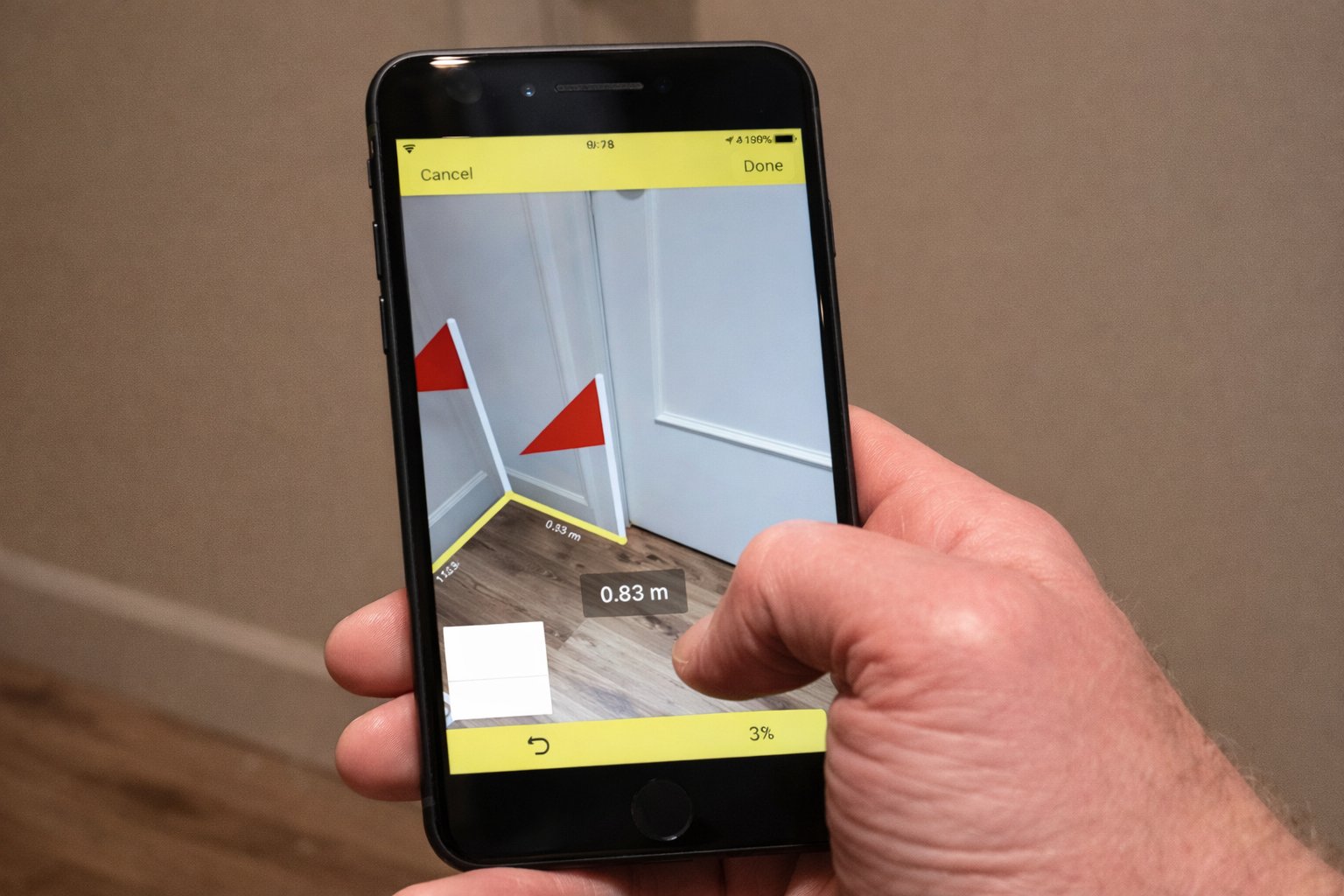
The magic happens through augmented reality (AR) technology. When you point your phone’s camera at an object or surface, the app analyzes the visual data and uses complex algorithms to calculate distances and dimensions. Some apps use reference points you place on your screen, while others automatically detect edges and surfaces.
For devices with LiDAR sensors—like certain iPhone and iPad models—measurements become even more precise. LiDAR shoots out laser pulses that bounce back from objects, creating detailed depth maps of your surroundings. This technology can measure distances up to several meters with millimeter-level accuracy.
Even without LiDAR, standard camera-based measurement apps deliver impressive results for everyday use. They typically require you to calibrate the app by pointing your camera at a known reference, such as a credit card or standard sheet of paper, establishing a baseline for subsequent measurements.
🎯 Why Choose Digital Measuring Over Traditional Methods
Traditional tape measures certainly have their place, but digital alternatives offer distinct advantages that make them incredibly practical for modern life. Convenience tops the list—your phone is likely already in your pocket, eliminating the need to hunt for measuring tools when inspiration strikes.
Digital apps excel at measuring hard-to-reach spaces. Need to measure ceiling height? Wall-to-wall distance across furniture? Vertical measurements without climbing a ladder? Your smartphone handles these scenarios effortlessly, often providing measurements in seconds where traditional methods would require assistance or awkward positioning.
Another compelling benefit is instant unit conversion. Most apps allow you to switch between metric and imperial systems with a single tap, displaying measurements in centimeters, meters, inches, feet, or yards simultaneously. This flexibility proves invaluable when working with international specifications or following instructions from different regions.
Documentation becomes seamless with digital tools. Many apps let you save measurements directly to photos, create floor plans, and share results instantly via email or messaging apps. This integrated approach streamlines projects from planning through execution, keeping all information organized in one place.
🛠️ Popular Applications and Their Unique Features
The app marketplace offers numerous digital measuring solutions, each with specialized capabilities tailored to different needs. Understanding what distinguishes these applications helps you choose the right tool for your specific requirements.
Measure apps that come pre-installed on many smartphones provide basic functionality that covers most casual measuring needs. Apple’s Measure app, for instance, automatically detects rectangular objects and can measure multiple dimensions simultaneously. It also includes a level function, making it genuinely multipurpose.
More specialized applications offer advanced features like 3D room scanning, automatic floor plan generation, and measurement history tracking. Some focus on construction and renovation projects, providing tools for calculating area, volume, and material quantities based on your measurements.

Professional-grade apps cater to architects, interior designers, and contractors who need precision measurements with annotation capabilities. These often include CAD export options, cloud synchronization for team collaboration, and integration with project management platforms.
💡 Practical Scenarios Where Digital Measuring Shines
Understanding when and how to use digital measuring tools maximizes their value in your daily life. These applications prove particularly useful in specific situations where traditional methods fall short or prove cumbersome.
Furniture shopping becomes stress-free when you have accurate room measurements at your fingertips. Instead of guessing whether that gorgeous sofa will fit through your doorway or match your space dimensions, simply measure the area with your phone while browsing online or in-store. Many apps even let you visualize furniture placement using AR overlays.
Home improvement projects benefit enormously from digital measuring capabilities. Planning a gallery wall? Measure spacing between frames with precision. Installing shelving? Check level and distance measurements simultaneously. Ordering blinds or curtains? Get exact window dimensions without wrestling with flimsy tape measures that never stay straight.
Real estate activities gain efficiency through smartphone measurements. Whether you’re a renter checking if your existing furniture fits a new apartment, a seller creating accurate listing descriptions, or a buyer evaluating space potential, quick measurements inform better decisions without scheduling multiple site visits.
Travel and moving situations where you don’t have access to traditional tools become manageable. Need to check if your luggage meets airline dimensions? Measuring artwork or purchases to determine shipping costs? Evaluating hotel room layouts? Your phone handles these spontaneous measurement needs effortlessly.
🎨 Tips for Getting the Most Accurate Measurements
While digital measuring apps are remarkably capable, following best practices ensures you achieve the most reliable results. Small adjustments to your technique can significantly improve measurement accuracy and consistency.
Lighting plays a crucial role in measurement precision. Well-lit environments help your camera distinguish edges and surfaces clearly, improving the app’s ability to calculate accurate distances. Natural daylight works best, but consistent artificial lighting also delivers good results. Avoid extreme shadows or backlighting that can confuse the sensors.
Steady hands make a noticeable difference. Many apps require you to move your device slowly across the measurement area to gather sufficient visual data. Rushed or shaky movements result in less accurate readings. Take your time, moving smoothly and deliberately while keeping the target object clearly in frame.
Reference point calibration shouldn’t be skipped. When apps request calibration using a known object, take this step seriously. Accurate calibration establishes the foundation for all subsequent measurements. Use standard-sized items as references—credit cards, letter-sized paper, or even US dollar bills which have consistent dimensions.
Surface considerations matter for optimal results. Measurement apps work best on clearly defined surfaces with distinct edges. Reflective, transparent, or extremely dark surfaces can challenge the sensors. When measuring such materials, try adding temporary reference markers like painter’s tape to help the app identify boundaries.
🔍 Understanding Measurement Limitations and Accuracy
Setting realistic expectations about what digital measuring apps can achieve helps you use them appropriately. While these tools offer impressive capabilities, they’re not perfect substitutes for professional-grade equipment in every situation.
Accuracy varies depending on your device capabilities and the specific app you’re using. Consumer-grade smartphones typically achieve accuracy within a few millimeters to a centimeter for distances under three meters. This precision suffices beautifully for furniture placement, room planning, and general household measurements.
For critical applications requiring extreme precision—such as construction blueprints, engineering projects, or legal documentation—traditional measuring tools or professional surveying equipment remain necessary. Think of smartphone apps as excellent tools for planning and estimation rather than final specifications for professional work.
Distance limitations also exist. Most apps work best measuring objects and spaces within about five to ten meters. Beyond these distances, accuracy decreases significantly. Measuring large outdoor spaces or building exteriors may require multiple measurements or specialized long-range measuring tools.
Environmental factors influence results. Vibrations, poor lighting, obstructed views, and surface textures all affect measurement quality. Understanding these limitations helps you recognize when conditions warrant double-checking measurements or using alternative methods.
🚀 Advanced Features That Enhance Functionality
Beyond basic length and distance measurements, many digital measuring apps include sophisticated features that expand their utility for specialized tasks. Exploring these capabilities unlocks additional value from applications you may already have installed.
Area and volume calculations eliminate manual math from projects. Point at a room’s corners, and the app automatically calculates square footage or cubic volume. This feature proves invaluable when estimating paint quantities, flooring materials, or storage capacity. Some apps even suggest material amounts based on calculated dimensions.
Angle measurement functions serve various purposes, from hanging pictures perfectly straight to checking if surfaces are truly perpendicular. Digital level indicators replace physical level tools for many quick checks around your home or workspace.
Photo annotation capabilities let you mark measurements directly on images. Take a picture of a space, add measurement lines and notes, then share the annotated image with contractors, family members, or online sellers. This visual communication eliminates confusion and provides clear reference points.
Height measurement features use clever tricks to calculate how tall objects or people are without physical contact. These typically work by identifying the ground plane and the top of the object, calculating the vertical distance between them. While not laboratory-precise, they’re remarkably useful for everyday curiosities and casual measurements.
🌟 Choosing the Right App for Your Needs
With dozens of measuring applications available, selecting the best option depends on your specific requirements, device capabilities, and intended use cases. Consider several factors when evaluating options.
Device compatibility comes first. Check whether apps fully utilize your smartphone’s hardware capabilities. If you have a LiDAR-equipped device, seek apps specifically designed to leverage that technology for enhanced accuracy. Older devices may work better with simpler apps that don’t demand cutting-edge sensors.
Feature requirements vary by user. Casual users might need only basic distance measurement, making free, straightforward apps perfect. Professionals should investigate specialized applications offering project management tools, export options, and collaboration features worth a subscription cost.
User interface design affects daily usability. Well-designed apps with intuitive controls make measuring effortless, while complicated interfaces create frustration. Download a few highly-rated options and test their usability before committing to any paid versions.
Review ratings and recent updates indicate app reliability. Active development, responsive support, and positive user feedback suggest applications that deliver on their promises and remain compatible with new device models and operating system updates.
📱 Setting Up and Using Your First Measurement
Getting started with digital measuring requires just a few simple steps. Once you understand the basic process, taking measurements becomes second nature, as quick and natural as snapping a photo.
Download your chosen app from the official app store and grant necessary permissions when prompted. Most measuring apps request camera access and sometimes motion sensor access to function properly. These permissions are essential for the technology to work, so approve them when asked.
Follow any initial calibration instructions carefully. Some apps walk you through a setup process using reference objects to establish measurement accuracy. Complete these steps thoroughly rather than rushing through them, as proper calibration significantly impacts all future measurements.
Start with simple measurements to build confidence. Measure familiar objects whose dimensions you already know—a book, smartphone, or standard door width. Compare app results against known measurements to understand your specific app’s accuracy characteristics.
Experiment with different features gradually. Once basic measurements feel comfortable, explore additional capabilities like area calculation, photo annotation, or measurement saving. Progressive learning prevents overwhelm and helps you discover which features provide the most value for your situation.
🏡 Real-World Applications for Homeowners
Homeowners discover countless practical uses for digital measuring apps once they integrate these tools into their routine. From minor decorating decisions to major renovation planning, smartphone measurements simplify home management.
Seasonal decorating becomes easier when you know exact dimensions. Measuring windows for curtains, determining Christmas tree height limits, or checking if patio furniture fits storage spaces—all these common household questions get instant answers without hunting for tape measures.
Maintenance and repair tasks benefit from quick measurements. Recording appliance dimensions for future replacement shopping, measuring filters or hardware that needs replacement, or documenting problem areas for contractor consultations all become streamlined processes.
Garden and outdoor projects gain precision through digital measuring. Planning garden bed layouts, measuring fence sections, determining paver quantities for walkways, or checking if new plants have sufficient spacing all work beautifully with smartphone measurement tools.
Organization projects achieve better results with accurate measurements. Measuring closet dimensions for storage solutions, checking shelf spacing for specific items, or planning garage organization systems all benefit from having precise dimensions before purchasing organizational products.
🔧 Troubleshooting Common Measurement Issues
Even with user-friendly apps, occasional measurement challenges arise. Understanding common problems and their solutions helps you maintain confidence in your digital measuring capabilities.
Inconsistent results across repeated measurements usually indicate inadequate lighting, unsteady hand movement, or unclear target surfaces. Address these issues by improving lighting conditions, taking more time with measurements, and ensuring surfaces have distinct, visible edges the camera can detect.
App crashes or frozen screens often result from insufficient device memory or outdated software. Close background applications to free resources, ensure your operating system is updated, and restart your device if problems persist. Reinstalling the app occasionally resolves persistent technical issues.
Measurements that seem obviously incorrect require recalibration. Return to the app’s calibration settings and repeat the setup process carefully. If problems continue after proper calibration, the specific surface or object you’re measuring may present challenges for AR technology, warranting alternative measuring methods.
Permission errors prevent apps from accessing necessary sensors. Visit your device settings, locate the measuring app, and verify that camera and motion sensor permissions are enabled. Without these permissions, measuring functionality cannot work properly.
🌐 The Future of Digital Measuring Technology
Emerging technologies promise even more impressive capabilities for smartphone-based measuring in coming years. Understanding these developments helps you appreciate how these tools will continue evolving and improving.
Artificial intelligence integration will enhance automatic object recognition and measurement suggestions. Future apps may identify common objects and automatically provide relevant measurements without manual input, recognizing furniture types and suggesting standard dimensions or flagging unusual sizes.
Improved sensor technology in upcoming smartphone generations will deliver professional-grade accuracy for consumer devices. As LiDAR and depth-sensing capabilities become standard features rather than premium additions, measurement precision will reach levels currently available only in specialized equipment.
Cloud-based collaboration features will connect measurement data across teams and projects seamlessly. Multiple users will contribute measurements to shared floor plans, creating comprehensive documentation for renovation projects, real estate transactions, or design collaborations regardless of physical location.
Integration with smart home systems may enable automated measurements that trigger actions. Imagine measuring a space for new furniture and having compatible items automatically suggested from your favorite retailers, or documenting room dimensions that feed directly into interior design software.
✨ Making Digital Measuring Part of Your Routine
The true value of smartphone measuring tools emerges when they become natural go-to solutions in your daily life. Building habits around these applications maximizes their benefit and ensures you’re always prepared for spontaneous measuring needs.
Keep your preferred measuring app easily accessible on your home screen rather than buried in folders. This simple placement makes launching measurements as quick as opening your camera, removing friction that might discourage use when you need dimensions quickly.
Practice measuring familiar objects periodically to maintain comfort with the technology. Regular use keeps you familiar with app interfaces and capabilities, ensuring you can measure confidently when important situations arise rather than fumbling through features under pressure.
Share your measuring capabilities with family and friends. Teaching others how to use these tools spreads awareness of their convenience and creates shared understanding when collaborating on projects involving measurements and planning.
Document important measurements for future reference. Save dimensions of frequently measured spaces, furniture, or objects within your app or notes application. This measurement library becomes increasingly valuable over time, eliminating repeated measurements of the same items.
Transform your smartphone into a versatile measuring tool that’s always ready when you need it. Digital tape measure apps represent practical innovation that simplifies everyday tasks while delivering surprisingly accurate results. From quick furniture checks to comprehensive room planning, these applications put measurement power directly in your pocket. 🎯📏
Whether you’re renovating your home, shopping for furniture, organizing spaces, or simply satisfying curiosity about dimensions around you, digital measuring tools make the process simple, fast, and remarkably effective. Download an app today and discover how convenient measurements can truly be when your smartphone becomes your tape measure.

Toni Santos is a visionary artisan and conceptual designer who channels the beauty of living organisms into structural expression. At Zureste, Toni explores the intricate elegance of insect anatomy, organic flow, and bioinspired design to create art that feels both natural and otherworldly.
Each creation Toni brings to life reflects a harmonic tension between structure and softness, wildness and control — echoing the complex intelligence found in the natural world. From beetle-like silhouettes to root-shaped contours, his work blurs the lines between biology, sculpture, and modern art.
Guided by fascination for metamorphosis, evolution, and pattern in nature, Toni’s pieces embody transformation. His BioLight Collection and conceptual series like Insect Type and Structure Aesthetics offer viewers more than aesthetic value — they present immersive experiences of living design.
As the creative force behind Zureste, Toni invites us to rethink beauty, architecture, and identity through a new lens — one shaped by wings, bones, spirals, and the microscopic poetry of the organic.
His creations reflect:
-
Design deeply rooted in the geometry of life
-
Inspiration from insects, roots, and the unseen natural order
-
A blend of science, spirituality, and visual storytelling
Whether you’re a lover of strange beauty, an admirer of evolution’s artistry, or a creative mind seeking something different, Toni welcomes you into a world where living forms become meaning, and surreal becomes sublime.