
Anúncios
Turn your smartphone into a powerful universal remote control and manage all your entertainment devices from a single, intuitive app.
We’ve all experienced that frustrating moment: you’re ready to relax and watch your favorite show, but the TV remote is nowhere to be found. Maybe it’s wedged between couch cushions, the batteries are dead, or it simply vanished into the void where missing socks go.
Anúncios
The good news? Your smartphone can eliminate this hassle entirely.

Modern smartphones have evolved into versatile control centers capable of managing virtually every smart device in your home. With the right apps and setup, you can control TVs, streaming devices, air conditioners, sound systems, and more—all from the device that’s already in your pocket. Let’s explore how to transform your phone into a comprehensive universal remote that simplifies your digital life. 📱
Anúncios
Why Your Smartphone Makes the Perfect Universal Remote
Traditional universal remotes require programming, often have confusing button layouts, and need regular battery replacements. Your smartphone, however, is always charged, always with you, and features an intuitive touchscreen interface that can be customized to your preferences.
Most modern TVs and smart devices connect via Wi-Fi or infrared technology, both of which your smartphone can utilize. Many phones come equipped with built-in IR blasters, while others rely on Wi-Fi connectivity to communicate with compatible devices. This flexibility means you can control both legacy equipment and cutting-edge smart home technology from a single device.
Beyond basic channel changing and volume control, smartphone remote apps offer advanced features like voice commands, personalized shortcuts, keyboard input for easier searching, and even the ability to share content directly from your phone to your TV screen. It’s a complete entertainment control solution that costs nothing beyond downloading an app.
Understanding the Technology Behind Mobile Remote Control 🔧
Two primary technologies enable your smartphone to function as a remote control: infrared (IR) and Wi-Fi connectivity. Understanding how each works helps you determine which devices you can control and what setup you’ll need.
Infrared Technology
Traditional remote controls use infrared light to communicate with devices. Some smartphones, particularly certain Samsung, Xiaomi, and Huawei models, include an IR blaster—a small component that emits infrared signals just like a conventional remote. If your phone has this feature, you can control almost any IR-compatible device without requiring the same Wi-Fi network.
The advantage of IR control is universal compatibility with older equipment. The limitation is that you need a direct line of sight between your phone and the device, and the range is typically shorter than Wi-Fi-based solutions.
Wi-Fi and Network-Based Control
Most modern smart TVs, streaming sticks, and connected devices communicate over your home Wi-Fi network. This method doesn’t require an IR blaster and works through walls and at greater distances. Apps designed for specific brands—like Samsung SmartThings, LG ThinQ, or Roku’s official app—connect to devices on your network and provide full control functionality.
Wi-Fi control typically offers more features than IR, including screen mirroring, content casting, keyboard input, and even gesture controls. The requirement is that both your phone and the device must be connected to the same network.
Setting Up Your Phone as a Universal Remote Control
Getting started is remarkably straightforward, regardless of whether you have an iPhone or Android device. The process typically involves downloading an appropriate app, connecting to your devices, and customizing the interface to suit your preferences.
For Android Users
Android phones offer extensive compatibility with universal remote apps. If your device has an IR blaster, you’ll have even more options. Start by checking your phone’s specifications to determine if it includes this feature.
Download a comprehensive universal remote app from the Google Play Store. Many excellent options provide control over multiple device types and brands. After installation, open the app and grant necessary permissions for network access and, if applicable, IR functionality.
The app will typically scan your Wi-Fi network for compatible devices. Select your TV or streaming device from the list, and the app will automatically configure the appropriate controls. For IR-based control, you may need to manually select your device brand and model from a database.
For iPhone Users
While iPhones don’t include IR blasters, they excel at Wi-Fi-based control. Apple’s ecosystem also includes AirPlay, which seamlessly connects to compatible TVs and streaming devices.
Download a universal remote app from the App Store that supports your specific devices. The setup process mirrors the Android experience: connect to your home Wi-Fi, allow the app to scan for devices, and select what you want to control.
Many apps also integrate with Apple’s HomeKit, allowing you to control compatible devices through Siri voice commands or the Home app that’s built into iOS. This integration creates a streamlined smart home experience that extends beyond just entertainment devices.
Compatible Devices You Can Control 📺
The range of devices compatible with smartphone remote apps is impressive and continually expanding. Here’s what you can typically manage from your mobile device:
- Smart TVs: Samsung, LG, Sony, TCL, Vizio, Hisense, and most other major brands offer native app support or work with universal remote apps.
- Streaming Devices: Roku, Amazon Fire TV Stick, Apple TV, Chromecast, and Android TV boxes all have dedicated apps or universal app compatibility.
- Cable and Satellite Boxes: Many providers offer dedicated apps, while IR-enabled phones can control nearly any set-top box.
- Sound Systems: Soundbars, AV receivers, and home theater systems from brands like Sonos, Bose, and Yamaha integrate with smartphone control.
- Air Conditioners: Split-system AC units and smart climate control systems often include smartphone app support.
- Media Players: DVD and Blu-ray players, gaming consoles, and other media equipment can frequently be controlled via smartphone apps.
Advanced Features That Enhance Your Experience ✨
Beyond basic button presses, modern remote control apps offer sophisticated features that improve how you interact with your entertainment devices.
Voice Control Integration
Many apps support voice commands, allowing you to say “play Stranger Things on Netflix” or “turn volume to 50 percent” instead of navigating through menus. This feature integrates with Google Assistant, Siri, or Amazon Alexa, depending on your ecosystem.
Personalized Macros and Shortcuts
Create custom shortcuts that execute multiple commands with a single tap. For example, a “Movie Night” macro might dim your smart lights, turn on your TV, launch Netflix, and adjust your soundbar—all simultaneously.
Content Casting and Screen Mirroring
Share photos, videos, and presentations directly from your phone to your TV. This feature is perfect for family gatherings, business presentations, or simply enjoying mobile content on a larger screen.
Keyboard Input
Typing on a traditional remote is tedious. Smartphone apps let you use your phone’s keyboard to search for content, enter passwords, or browse the web on your TV—dramatically faster than navigating an on-screen keyboard with directional buttons.
Troubleshooting Common Connection Issues 🔍
While setup is generally smooth, you might occasionally encounter connectivity problems. Here are solutions to the most common issues:
Device Not Found During Scanning
Ensure both your phone and the device are connected to the same Wi-Fi network. Many routers create separate 2.4GHz and 5GHz networks—devices must be on the same band to communicate. Restart both your phone and the device, then try scanning again.
IR Remote Not Working
Check that your phone actually has an IR blaster by consulting the manufacturer’s specifications. Ensure nothing is blocking the IR sensor on your phone, and that you’re pointing it directly at the device. Some protective cases can interfere with IR transmission.
Commands Delayed or Unresponsive
Network congestion can cause delays in Wi-Fi-based control. Try moving your router closer to your entertainment center, reducing the number of connected devices, or upgrading to a more powerful router. Closing background apps on your phone can also improve responsiveness.
App Crashes or Won’t Open
Ensure your app is updated to the latest version. Clear the app’s cache in your phone settings, or uninstall and reinstall it completely. Check that your phone’s operating system is also current, as older OS versions may have compatibility issues.
Security Considerations for Smart Home Control 🔒
When your smartphone controls multiple devices across your home network, security becomes important. Follow these best practices to protect your digital environment:
Always use strong, unique passwords for your Wi-Fi network and any smart device accounts. Enable two-factor authentication wherever available. Keep your router’s firmware updated, as manufacturers regularly patch security vulnerabilities.
Download remote control apps only from official app stores, and review the permissions they request. Legitimate apps need network access, but be wary of those requesting unnecessary permissions like contacts or location data.
Consider setting up a guest network for smart home devices, separating them from computers and phones that contain sensitive personal information. This segmentation limits potential damage if a smart device is compromised.
Maximizing Battery Life While Using Remote Apps 🔋
Remote control apps do consume battery power, particularly those maintaining constant Wi-Fi connections. Optimize battery usage with these strategies:
Close the remote app when not actively using it, rather than leaving it running in the background. Enable battery optimization settings for the app in your phone’s system settings, which limits background activity.
Reduce your screen brightness when using the app—you don’t need maximum brightness for a remote control interface. Consider using dark mode versions of apps if available, as darker pixels consume less power on OLED and AMOLED displays.
For IR-based control, remember that the IR blaster uses minimal power compared to Wi-Fi connectivity. If battery life is critical, IR control can be more efficient than network-based alternatives.
Multi-Room Control and Whole-Home Integration 🏡
Once you’ve mastered single-device control, expand your setup to manage multiple rooms and create a comprehensive smart home ecosystem.
Many universal remote apps support multiple device profiles, allowing you to switch between controlling your living room TV, bedroom streaming stick, and patio speakers without reconfiguration. Organize devices by room for intuitive navigation.
Integration with smart home platforms like Google Home, Amazon Alexa, or Apple HomeKit creates powerful automation possibilities. Schedule your entertainment system to turn on at specific times, or link device control to other smart home triggers—like automatically lowering your TV volume when your smart doorbell detects someone at the door.
The Future of Smartphone Remote Control Technology 🚀
As smart home technology evolves, smartphone remote capabilities continue expanding. Emerging technologies promise even more seamless control experiences.
Artificial intelligence is making remote apps smarter, learning your viewing habits and suggesting content based on your preferences. Gesture controls using your phone’s accelerometer and gyroscope are becoming more sophisticated, allowing you to change channels with a wave or adjust volume with a twist.
Matter, the new universal smart home standard, promises improved compatibility across different brands and ecosystems. This means future smartphone remote apps will work with virtually any smart device, regardless of manufacturer.
Augmented reality features may soon let you point your phone’s camera at a device to instantly access its controls, eliminating the need to navigate through app menus. Haptic feedback technology will make touchscreen controls feel more like physical buttons, improving the tactile experience.
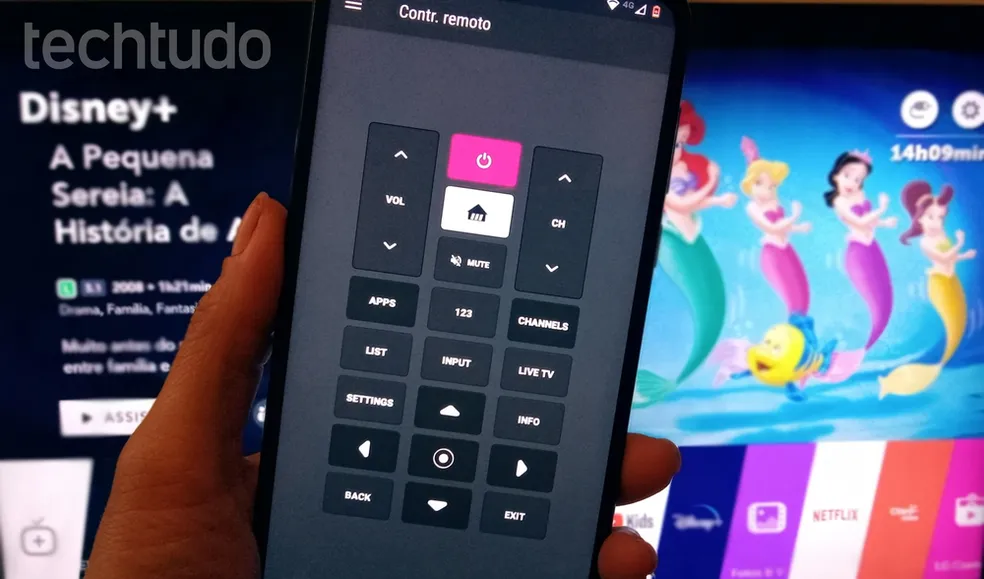
Making the Switch: Saying Goodbye to Traditional Remotes
Once you’ve experienced the convenience of smartphone remote control, returning to traditional remotes feels archaic. The combination of always-available access, advanced features, and unified control across multiple devices creates a superior entertainment management experience.
Start by controlling your most-used device—typically your main TV or streaming stick—and gradually expand to other equipment as you become comfortable with the technology. Within weeks, you’ll wonder how you ever managed with a coffee table cluttered with multiple remotes.
The transformation doesn’t require expensive equipment or technical expertise. Your existing smartphone already has the capabilities; you simply need to unlock them with the right app and a few minutes of setup. The result is a cleaner living space, simplified device management, and access to features that traditional remotes could never provide.
Your smartphone is already an essential part of your daily life—now it can also be the command center for your entire entertainment ecosystem. Download a universal remote app today and experience the future of home device control. 🎮

Toni Santos is a visionary artisan and conceptual designer who channels the beauty of living organisms into structural expression. At Zureste, Toni explores the intricate elegance of insect anatomy, organic flow, and bioinspired design to create art that feels both natural and otherworldly.
Each creation Toni brings to life reflects a harmonic tension between structure and softness, wildness and control — echoing the complex intelligence found in the natural world. From beetle-like silhouettes to root-shaped contours, his work blurs the lines between biology, sculpture, and modern art.
Guided by fascination for metamorphosis, evolution, and pattern in nature, Toni’s pieces embody transformation. His BioLight Collection and conceptual series like Insect Type and Structure Aesthetics offer viewers more than aesthetic value — they present immersive experiences of living design.
As the creative force behind Zureste, Toni invites us to rethink beauty, architecture, and identity through a new lens — one shaped by wings, bones, spirals, and the microscopic poetry of the organic.
His creations reflect:
-
Design deeply rooted in the geometry of life
-
Inspiration from insects, roots, and the unseen natural order
-
A blend of science, spirituality, and visual storytelling
Whether you’re a lover of strange beauty, an admirer of evolution’s artistry, or a creative mind seeking something different, Toni welcomes you into a world where living forms become meaning, and surreal becomes sublime.